Now on the App Store. Your aircraft records, ready for the hangar.
Download for iPhone & iPadAircraft logbook digitizer & maintenance tracker
Your annual is in three weeks. The logbooks are a cardboard box.
Photograph the pages, or upload the scans you already have. A vision model reads each one into a structured entry — the date 1979-04-12, tach 2214.7, the work performed, the parts, AD 79-08-03, the signing mechanic and certificate number — scores its own confidence field by field, and puts the result beside the original page for you to confirm.
Minutes per page plus your review time, and nobody else ever handles your books. The other way to get decades of paper into data is to mail them to a transcription service, wait days to weeks, and pay in the hundreds per aircraft.
Email link or a password — one page, no card, nothing to cancel. Every new account already has a demo aircraft in it (N734DM, a fictional 1978 Cessna 172N with decades of history), so there is something to poke at before you scan anything of your own.
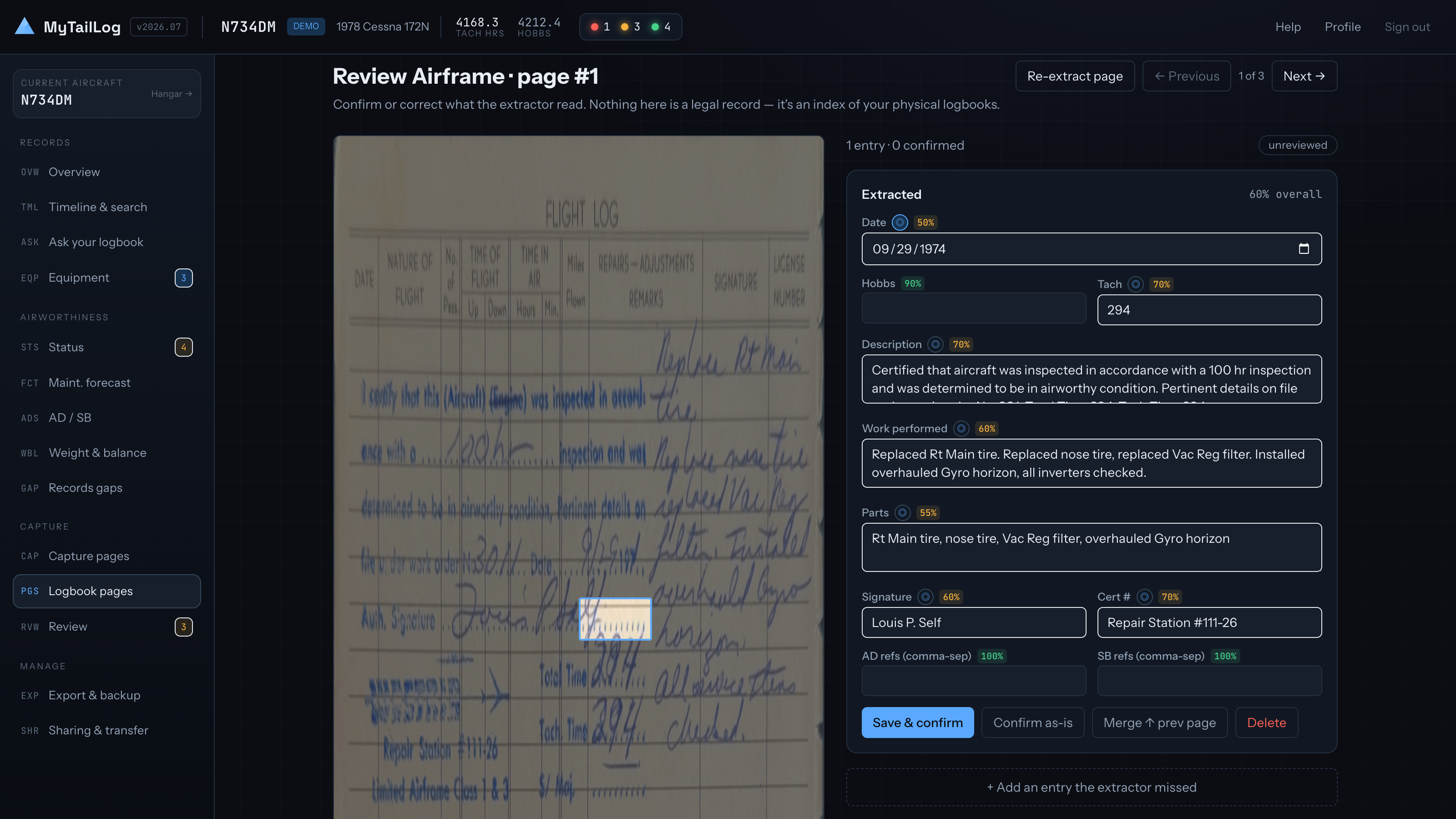
What's due
Then it starts telling you things
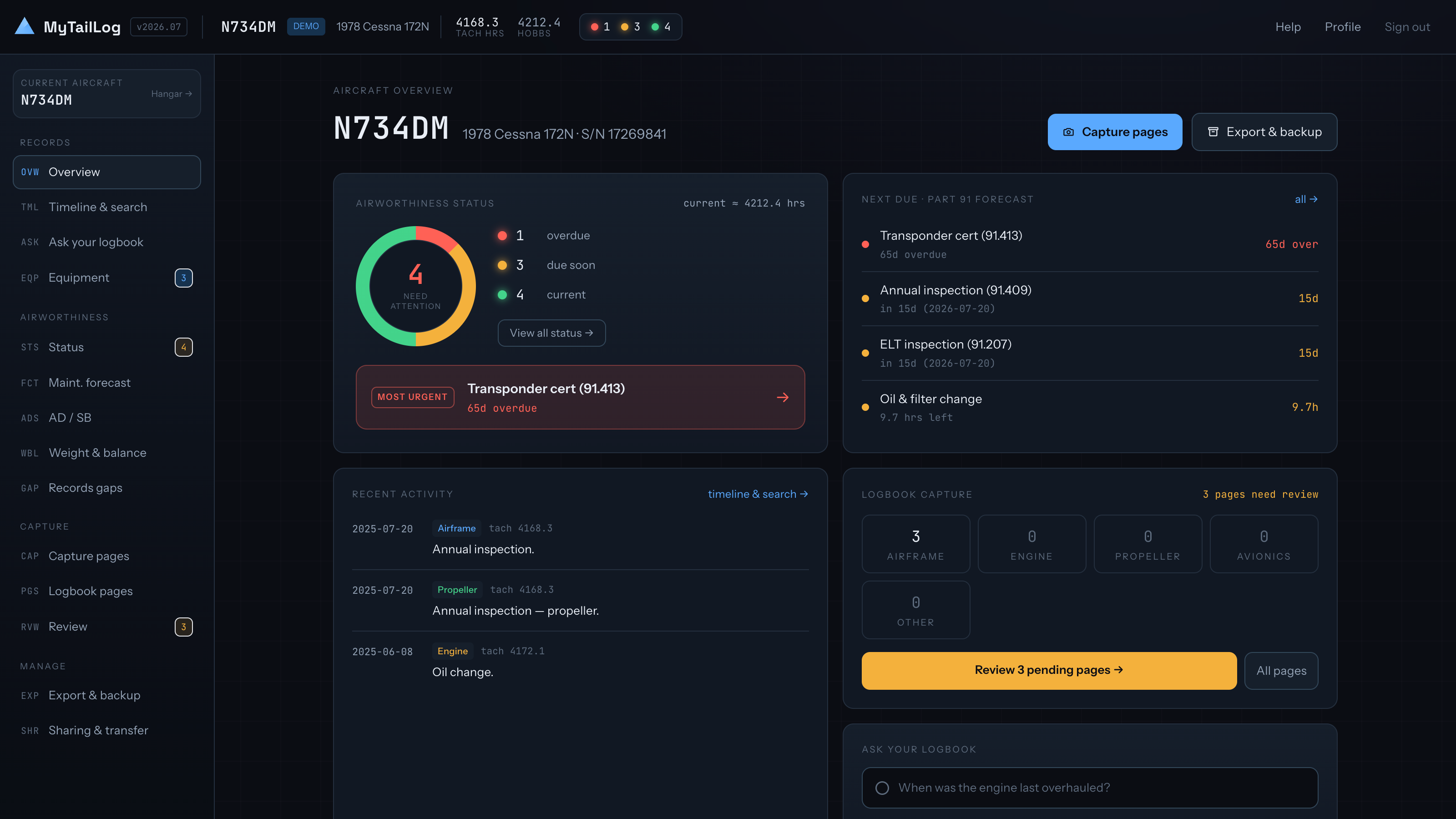
Every inspection, recurring item and AD on one grid, coloured by how close it is. Part 91 recurring items are tracked on hours andon the calendar, and an hours countdown is projected onto a date from how much you actually fly — so “due in 38.4hours” also reads as a month you can plan around. Every projection is marked ≈, carries a confidence drawn from how much reading history backs it, and never overrides a real calendar limit.
AD and SB compliance carries an official FAA reference lookup — the Federal Register for anything post-1994, with a DRS fallback for the legacy ones — and AD discovery searches by manufacturer, model or keyword, listing the models each AD names with yours highlighted.
Email reminders go out before things come due, with a lead time you set per item.
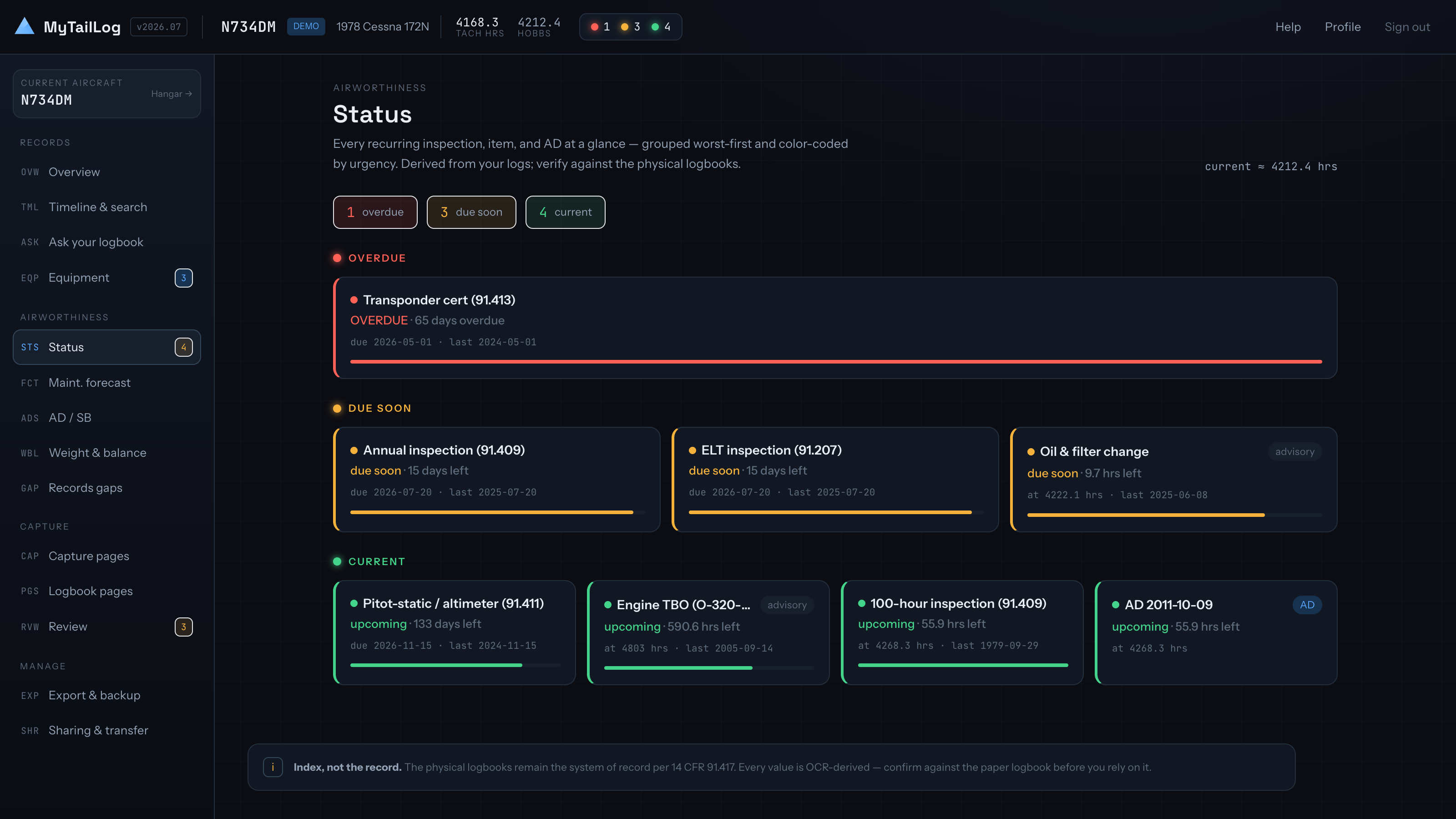
Ask it
Questions, not file names
Ask in plain English — when was the vacuum pump last replaced, has the seat rail AD ever been done — and the answer arrives with the entries it came from cited underneath, so you can check the reasoning against the scan rather than trust it.
The same reading builds an installed-equipment list from what the logs say went in and came out, and a records-gap audit that points at the stretches where the book simply skips.
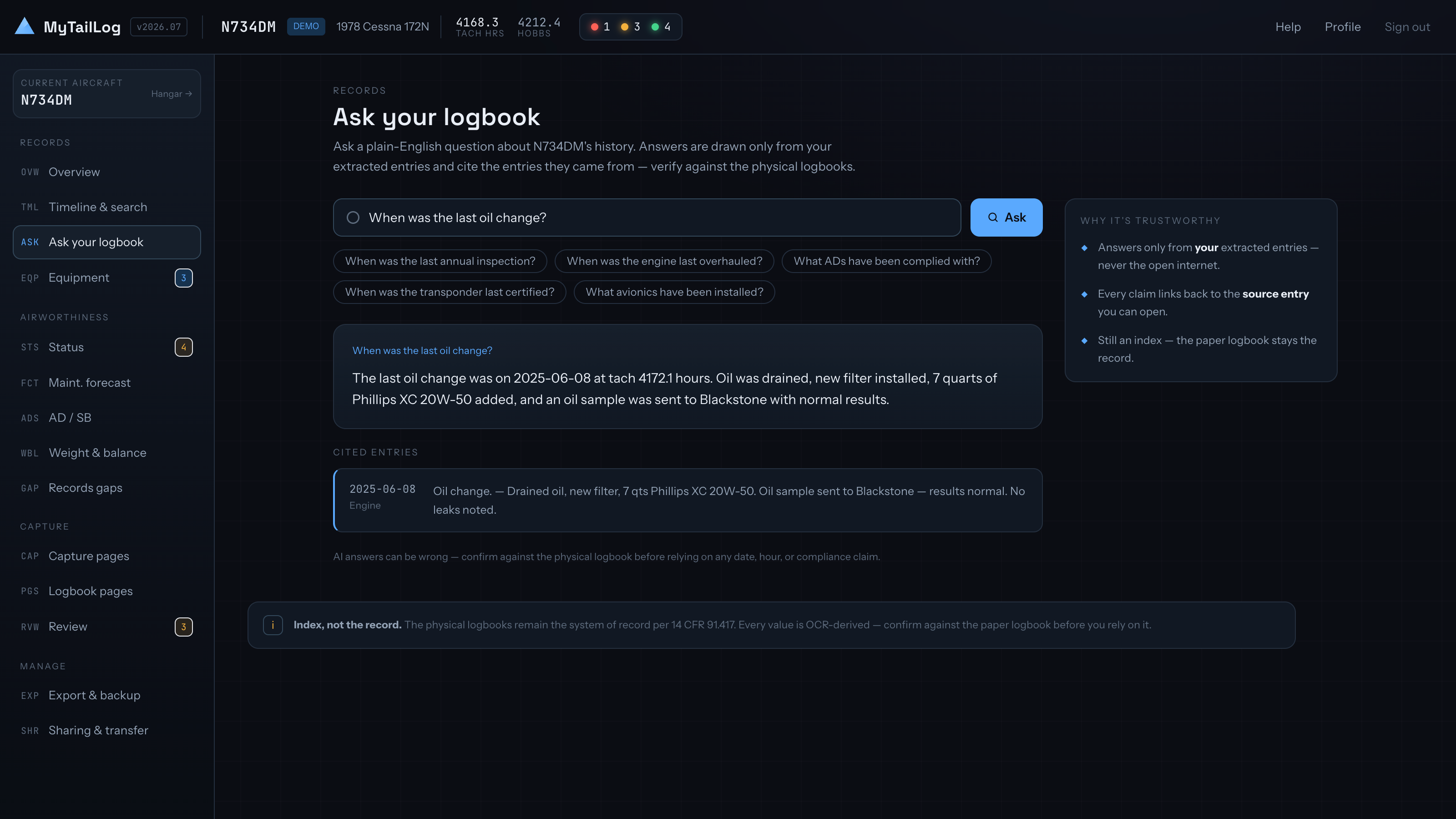
Find it
One timeline across every book
Airframe, engine, prop, avionics and a catch-all “other” book, merged into a single searchable timeline. Search the work text, filter by book, jump to the scan the entry was read from.
Duplicate detection flags likely repeats by date, tach/hobbs and work text, so re-captures and re-extractions don't quietly pile up — and hobbs and tach readings are reconciled against each other rather than averaged into a number that flatters your hours.
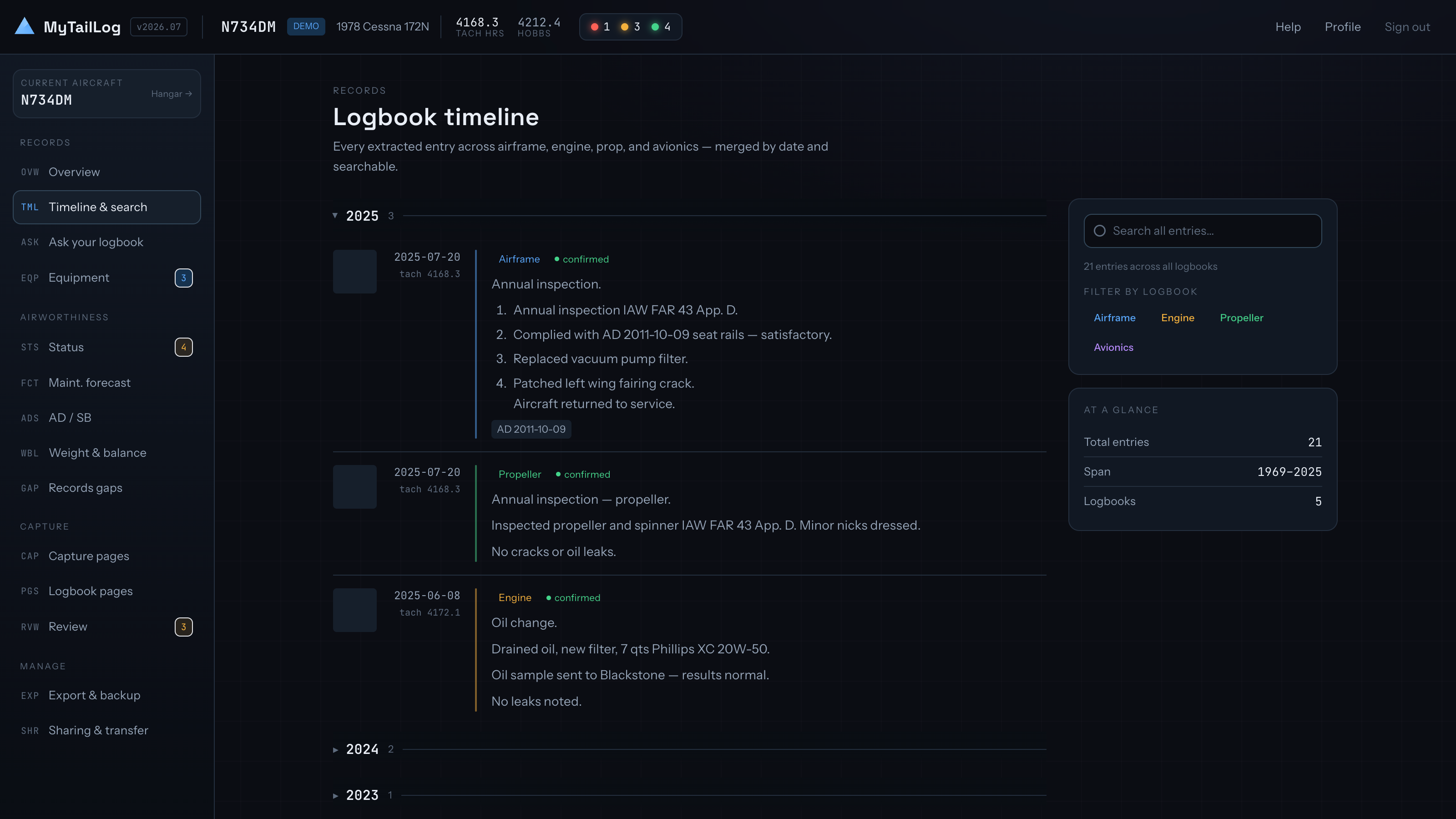
Keep it
The documents, not just the entries
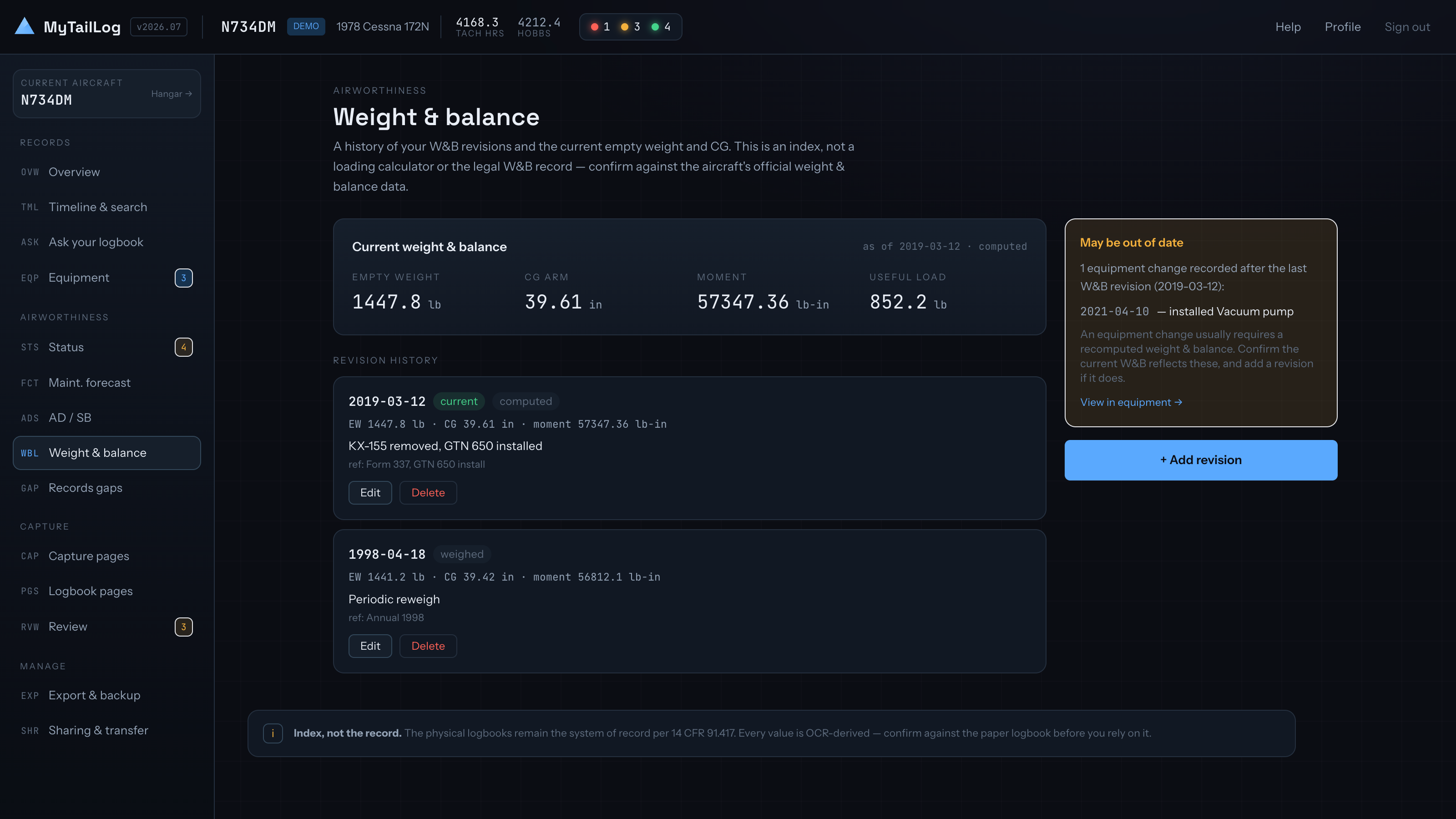
Weight & balance is kept as a revision history with the current empty weight and CG on top, flagged stale when equipment changed after the last revision. Scan a new W&B sheet and it files itself as the next revision; scan an A&P's AD compliance report and it becomes the ground truth for your AD state.
The Records Vault holds the permanent paperwork beside the logbook scans — airworthiness certificate, registration, radio station authorization, POH/AFM, STCs, 337s, 8130-3s, manuals.
Per aircraft
And one place it all lands
Each aircraft gets its own view: status, hours, open squawks, oil trend, what's next. Squawks are reported by anyone with access — including a pilot you've shared the aircraft with — carry a severity and a reporter, and stay open until an editor resolves them.
Share an aircraft as viewer or editor, transfer ownership, or delete it. Everything is scoped by Postgres row-level security rather than application code, through a single access check every table routes through.
Why it is free
Free is a fact about the code, not a promise about next year
There is no billing in MyTailLog at all — no plans, no tiers, no trial clock, no card field, no payment code anywhere in the app. The repository is public and MIT-licensed, so that is not a claim you have to take on trust; it is a thing you can go and check.
It also means the exit is real. Everything you put in comes back out as a .zip of every row as JSON plus the original scans, re-importable into any instance — including one you run yourself, on your own Supabase and your own Anthropic or OpenAI key. Portability that survives us losing interest is a stronger promise than portability that depends on us staying nice.
The one line item that costs real money is the AI. Reading a logbook page is a vision-model call, billed to whoever's key is used — so shared use is capped two ways, a per-person daily call limit and an overall daily-dollar ceiling. If the day's shared budget runs out, extraction pauses until tomorrow and everything else keeps working.
Add your own Anthropic or OpenAI key in Profile and the calls bill to your account at list prices, with a much higher limit. The numbers, and everything else about cost and privacy, are in the FAQ.
The rest of it
Everything else it does
Capture & extract
- Capture with your phone's own camera — or upload PDF, JPEG, PNG
- Pages queue on the device with no signal and upload when you're back
- Five logbook types: airframe, engine, prop, avionics, other
- Per-field confidence scores; low-confidence fields are held back from bulk-confirm
- CSV import — one AI pass maps your columns, then every row converts in plain code. CSV only, up to 5 MB / 5,000 rows, maintenance entries
- Duplicate finder across scans and entries
- Scan a W&B sheet or an AD compliance report and it applies itself
Track & forecast
- Status grid, coloured by urgency
- Part 91 recurring items on hours and on the calendar, with an ≈ projected date and a confidence
- AD/SB compliance with FAA reference lookup (Federal Register, DRS fallback)
- AD discovery by manufacturer, model or keyword
- Installed equipment rebuilt from the logs
- Weight & balance revisions, flagged stale after an equipment change
- Records gap audit
- Squawks — anyone with access reports, an editor resolves
- Email reminders with your own lead time per item
Hours & engine health
- Hobbs↔tach reconciliation, so an inflated hobbs doesn't drive your forecast
- MyFlightBook sync pulls your latest hobbs/tach once a day
- ADS-B passive hours — opt-in per aircraft, off by default; it only ever suggests a meter value, never writes one
- Oil analysis — a lab report in, wear metals charted against the lab's universal average
- Oil consumption — hours per quart between top-offs
- Bring your own Anthropic or OpenAI API key to bill AI usage to your own account
Keep it & leave with it
- Records Vault for the permanent paperwork
- A printable maintenance summary — the page you hand a buyer, an insurer or an IA
- A full .zip backup of every row as JSON plus the original scans, re-importable
- Automatic backups to your own Dropbox and/or Google Drive, monthly or quarterly
- Sharing (viewer / editor), ownership transfer, delete
- A read-only OAuth 2.1 API and a self-serve developer portal
- A free iPhone and iPad app on the App Store, with offline records and capture
- MIT licence — run the whole thing yourself
Limits
What it doesn't do
- No accuracy percentage, because nothing here measures one
- What you get instead is a confidence score per field, the scan beside the entry, and the flagged fields held back from bulk-confirm. That catches what the model knows it is unsure of. It cannot catch what the model was confidently wrong about — your review is what closes that gap, and it is real work.
- No scheduling, dispatch, invoicing or billing
- Deliberately out of scope, not a roadmap item. Same for eSignatures, parts inventory, work orders and multi-fleet MRO management. If you need a booking calendar and rental rates, an ops platform does that and this does not.
- Native mobile is iPhone and iPad only
- The free app is available on the App Store. Sync an aircraft once to browse its records offline, capture pages, and record updates that upload on the next sync. AI extraction and Ask need a connection. There is no native Android app; the web app works in a browser.
- CSV import is CSV, and it is maintenance entries
- Not XLSX — save it as CSV first, which is one step. Up to 5 MB and 5,000 rows, creating log entries only, and everything imported lands unconfirmed until you have reviewed it.
Start with one page and see what comes back
Sign in with an email link or a password. Nothing to install, no card, and a demo aircraft is already loaded so you can look around first.